CRM to LOS Data Sync: What Moves and What You Re-Key
“Bidirectional” describes how the loan file gets created. It does not describe the relationship afterward.
That distinction is the whole subject and almost nothing published on it says so. A loan can start in either system. Most often it starts where the application is taken, on the CRM or point-of-sale side, and gets pushed across. Either way, the LOS becomes the parent record the moment the file exists. From that point your CRM to LOS data sync runs one way for the life of the loan.
It holds across most LOS integrations, and the documentation usually says so where anyone looks. Sync once to create the file. After that, changes made in the CRM do not reach the LOS at all.
The file has one parent, and it is not your CRM
Once the loan exists in the LOS, the LOS owns it, regardless of which system created it.
Most files start on the CRM or point-of-sale side, because that is where the borrower completes an application. A file started directly in the LOS comes back the other way and creates the record in the CRM. Both are normal. Neither changes what happens next.
Press the sync button a second time and you get an error saying the file already exists. Update a borrower’s phone number in the CRM after that point and the LOS never hears about it. Someone has to type it in the other system, or it stays wrong in the one that matters.
This is correct behavior, not a defect. The loan file is the regulatory record and it should have one owner. But it changes how you work, and most teams learn it the first time a correction fails to land.
Two consequences worth designing around. Everything you want in the LOS has to be right before the initial push, because that is the only push. And your CRM becomes a display surface for loan data rather than a place to edit it. That is a different habit from the one people arrive with.
Settle which system owns the record before you configure anything. The sync argument is unresolvable until that is decided.
What actually moves, by category
Ask what fields sync between CRM and LOS and you will get a yes. Ask by category, and by how the connection is built, and the answer separates.
| Category | API integration | Middleware connection |
|---|---|---|
| Loan creation | Either direction, most often CRM or POS to LOS | Usually LOS to CRM only |
| Borrower and co-borrower detail | Carries | Carries what was mapped |
| Employment and income | Carries, often in full | Possible, with work |
| Assets and liabilities | Carries | Possible |
| Payment breakdown | Carries | Possible |
| Service providers, agent and title | Carries where documented | Possible |
| Status and milestones | Carries, with timestamps | Usually a second build |
| Critical dates | Carries, often dozens | Possible |
| Documents | CRM to LOS on approval | Possible |
| User assignment | Carries, by matched user ID | Possible |
Two things about reading a table like this. It describes what a connection can do, not what yours does, and those differ. A connection that can carry service providers will not carry them if nobody mapped them at setup. And bidirectional LOS integration is a property of each category rather than of the whole connection.
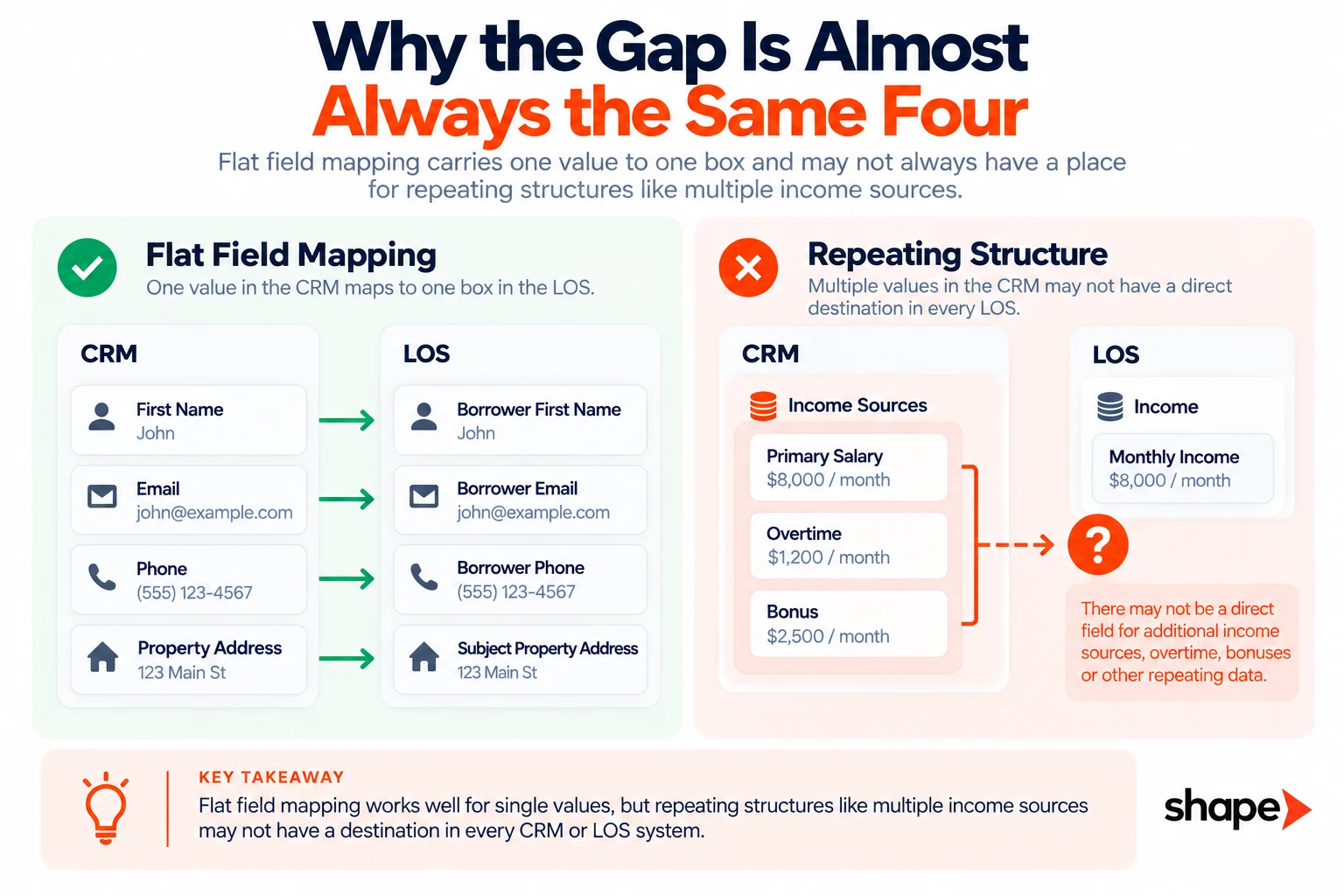
The pattern in the right-hand column is not random. Everything marked possible is a repeating structure rather than a single value. A borrower has several employers. A file has several income sources and several service providers.
Mapping a field moves one value into one box. A list needs more than that, so it takes deliberate work rather than a field pairing. That work is real and somebody has to maintain it. These categories are the ones missing when nobody checked.
Shape’s best mortgage CRM integrations with LOS platforms are built API-first for this reason.
Dates are the category that drives your outreach
Most integration conversations stop at status. Dates are where the value is, and they are documented least.
A status tells you where the file is. A date tells you when to call. LOS status write-back gets the attention in every evaluation, and dates quietly do more work. Rate lock expiration, estimated closing, appraisal contingency, financing contingency, first payment, closing disclosure received, loan estimate expired. Every one of those is a reason to contact somebody. Each arrives on a schedule rather than on an event.
A well-documented integration carries dozens of them. Application taken, pre-approval, rate locked, appraisal inspection, condition submission, closing disclosure received, funded. Alongside those sit processing dates covering title binder, flood and hazard binders, verifications and tax transcripts.
What makes them worth more than status is what you can hang off them. A good CRM fires a trigger a set number of days before or after any of them. That turns a date field into a campaign. Seven days before a rate lock expires. The day after a closing disclosure is received.
Ask about dates specifically in any integration conversation. Nobody volunteers them, because they are less impressive to demo than a status changing on screen.
The gap depends on how the connection was built
Where categories go missing, they go missing together, and the reason is architecture.
An API integration carrying a MISMO file moves the whole application. Employment, income, assets, liabilities and declarations sit inside the file, so there is no mapping decision to get wrong. A named-field API integration moves a documented list, and that list is long because somebody built it once.
A middleware connection moves whatever a person mapped by hand. A middleware setup looks like this. Create a source in the CRM and copy its posting URL. Export the CRM’s field names. Then map each LOS field to each CRM field by hand. Status updates often need a second build entirely, with two steps. The first call finds the record so the second can update it.
None of that is a criticism of middleware. It is the right answer for the long tail of systems that need a few fields moved on a trigger. It is a description of why the categories that go missing are always the structured ones. Nobody hand-maps a repeating employment history through a form post.
Failures here can be narrow in a way that is hard to spot. On some file-based methods a single identifying field has to be present in the initial push. Leave it out and several unrelated fields silently fail to populate with it, from income detail through to housing expenses. One missing field silently takes five others with it.
Fifteen minutes is not real time, and that is usually fine
Most API integrations update on a cycle measured in minutes, commonly around fifteen.
Some push on a change event and some poll on an interval. Both land in the same range once you account for queuing. Bulk updates extend it, because a few thousand changes enter a queue and get processed in order. A loan file left open in the LOS is usually locked. It does not update until somebody saves and closes it.
Fifteen minutes is fine for almost everything. It is not fine for one thing, which is anything you have promised to act on immediately. Decide which promises those are. Then check the interval against them rather than against an idea of real time.
The question to ask is not how fast the sync runs. It is what your fastest promise to a borrower is, and whether the data behind it arrives sooner than that.
The AUS layer most integration conversations skip
Conditional approval data does not come from your LOS, and most integration conversations never mention it.
Desktop Underwriter, Loan Product Advisor and your warehouse lender’s system each produce decisions that should reach the CRM. A clear-to-close is the highest-value trigger in the file. It is the moment a borrower expects to hear from a person.
If that decision reaches your CRM a day after it happens, the window is gone. Nobody measures it, because the field does eventually arrive and the report shows it populated.
Ask where AUS decisions land and how fast. It is a different answer from the LOS question and it rarely gets asked.
How to audit your CRM to LOS data sync in an afternoon
Stop asking your vendor and go look. The method takes one afternoon.
Export the field list from your LOS. Export the field list from your CRM. Both systems produce one.
Then pick ten live files across different stages. One at application, a few in processing, one at clear-to-close, one funded. For each, open the LOS record and the CRM record side by side. Walk the categories in the table above.
Write down three things per category. Did it arrive. Which direction. How stale is it.
Two results tell you something is wrong. A category that arrived on some files and not others means the mapping depends on an undocumented condition. Usually a loan product or a channel. And a category that arrived everywhere but sits days behind means the interval is the problem rather than the mapping. Those get fixed differently, which is why the audit records staleness rather than just presence.
The delta will not match what you were told. What you were told described capability. What you have is somebody’s configuration of it. Mortgage CRM field mapping gets set once at setup, by a person whose assumptions nobody has revisited. Getting it right the first time is part of standing the system up properly.
Which missing fields actually cost money
A missing field costs you when it drives an action. It costs you nothing when it sits in a record nobody reads.
That is the whole test, and it sorts the list quickly.
Income that never arrives costs you, because a processor re-keys it on every file. A rate lock expiration that never arrives costs you, because nobody calls before it lapses. A condition that never arrives costs you, because somebody chases a document that was already cleared.
A property county that never arrives costs you nothing. Neither does the appraisal order number or the investor code. Forty other fields live in the LOS because the LOS needs them, not because you do.
Most gap lists are long because nobody applied the test. Apply it and the list gets short enough to fix. That triage is the right question to bring to a demo. It beats the feature checklist in most guides on what to look for in a mortgage CRM.
What to do about a gap you cannot close
Three options, and picking one beats living with it.
Backfill it from a second source, which works where another system holds the same data and will hand it over. Move the field’s owner, so the CRM becomes the system of record for something the LOS was holding. Or accept it and say so out loud. Then nobody builds a report on a field that is empty half the time.
The one thing not to do is leave it undecided. An unacknowledged gap becomes a manual step, and a manual step becomes somebody’s job that nobody assigned.
Write the decision down, per category, next to the audit. That document is worth more than it looks. It answers the question when somebody asks why a report is wrong. It is the brief when you next change platforms. And it is the list a new operations hire needs in week one.
Frequently asked questions
Is CRM to LOS integration really bidirectional?+
Only for creating the file. Your CRM can push a new loan into the LOS once. After that the LOS becomes the parent record and updates flow one way, from the LOS back to the CRM. Changes made in the CRM after the initial push do not reach the LOS. Get the data right before that first sync, because there is no second one.
What fields sync between a mortgage CRM and an LOS?+
It depends on how the connection was built rather than on which systems they are. An API integration carrying a MISMO file moves the whole application, including employment, income, assets and liabilities. A middleware connection moves whatever somebody mapped by hand, which is why structured categories go missing there. Ask by category, not by system.
How often should a CRM and LOS sync?+
Most API integrations run on roughly a fifteen-minute cycle, and bulk updates can extend that. Fifteen minutes is fine for almost everything. Check it against your fastest promise to a borrower. That is the only place the interval actually costs you.
What happens to fields the integration does not carry?+
Somebody types them in, usually a processor, usually on every file. That cost is invisible because it is spread across people rather than showing up in a budget. Decide per field. Backfill it from another source, move which system owns it, or accept the gap and stop building reports on it.
{“@context”:”https://schema.org”,”@type”:”FAQPage”,”mainEntity”:[{“@type”:”Question”,”name”:”Is CRM to LOS integration really bidirectional?”,”acceptedAnswer”:{“@type”:”Answer”,”text”:”Only for creating the file. Your CRM can push a new loan into the LOS once. After that the LOS becomes the parent record and updates flow one way, from the LOS back to the CRM. Changes made in the CRM after the initial push do not reach the LOS. Get the data right before that first sync, because there is no second one.”}},{“@type”:”Question”,”name”:”What fields sync between a mortgage CRM and an LOS?”,”acceptedAnswer”:{“@type”:”Answer”,”text”:”It depends on how the connection was built rather than on which systems they are. An API integration carrying a MISMO file moves the whole application, including employment, income, assets and liabilities. A middleware connection moves whatever somebody mapped by hand, which is why structured categories go missing there. Ask by category, not by system.”}},{“@type”:”Question”,”name”:”How often should a CRM and LOS sync?”,”acceptedAnswer”:{“@type”:”Answer”,”text”:”Most API integrations run on roughly a fifteen-minute cycle, and bulk updates can extend that. Fifteen minutes is fine for almost everything. Check it against your fastest promise to a borrower. That is the only place the interval actually costs you.”}},{“@type”:”Question”,”name”:”What happens to fields the integration does not carry?”,”acceptedAnswer”:{“@type”:”Answer”,”text”:”Somebody types them in, usually a processor, usually on every file. That cost is invisible because it is spread across people rather than showing up in a budget. Decide per field. Backfill it from another source, move which system owns it, or accept the gap and stop building reports on it.”}}]}