Mortgage Email Deliverability: How to Reach the Inbox Without Risking Your Domain
Mortgage emails land in spam because the inbox providers judge the sender before they read the message. Authentication, reputation and how recipients react carry most of the weight. The words in the email carry less than most people think.
For a lender, the stakes are higher than a weak campaign. The domain sending your marketing is often the same domain carrying disclosures, loan documents and processor email. Burn it with one bad blast, and the damage reaches the borrowers already in your pipeline.
Why mortgage emails land in spam
Gmail, Yahoo and Outlook filter on three questions. Can they prove the email came from you? What is your sending history? Do recipients want it?
Proof. SPF, DKIM and DMARC tell the receiving server your domain authorized the send. Mail without them looks like spoofing, and lenders get spoofed constantly.
History. Every sending domain builds a reputation. High bounces, spam reports and sudden volume spikes all lower it. A low reputation sends good email to spam along with the bad.
Reaction. Opens, replies, deletes without reading and “report spam” clicks all feed the filter. A borrower who marks one message as spam affects how your next thousand land. Carriers apply the same logic to texts, which is the core of SMS deliverability for mortgage teams.
Content matters at the edges. Broken links, misspellings and image-only emails draw scrutiny. But a clean message from a damaged domain still goes to spam.
Deliverability comes before everything else in mortgage email marketing. A sequence nobody receives cannot convert.
What Gmail, Yahoo and Outlook now require
All three providers now set hard rules for bulk senders. A lender emailing a past-client database is a bulk sender, whether it feels like one or not.
| Provider | Who it applies to | What it requires |
|---|---|---|
| Gmail | All senders, with extra rules above 5,000 messages a day to Gmail accounts | SPF or DKIM for all. SPF, DKIM, DMARC and one-click unsubscribe above 5,000 a day. Spam rate below 0.3% |
| Yahoo | Bulk senders | SPF, DKIM and DMARC. Spam rate below 0.3%. One-click unsubscribe honored within two days |
| Outlook | Domains sending over 5,000 emails a day to Outlook.com, Hotmail and Live addresses | SPF and DKIM must pass. DMARC at p=none or stronger, aligned with SPF or DKIM |
Authentication
Gmail’s rules took effect February 1, 2024. Bulk senders need SPF, DKIM and DMARC, and the domain in the From line must align with the authenticated domain. Microsoft followed in 2025. Its April 2025 update says failing messages are rejected with error 550 5.7.515, starting May 5, 2025.
Rejected is not the same as spam. A rejected email never arrives anywhere.
One-click unsubscribe
Gmail and Yahoo require a one-click unsubscribe in the header of marketing email. They also want a visible link in the body. Yahoo says to honor it within two days.
Federal law sets its own floor. The FTC’s CAN-SPAM compliance guide says opt-outs must be honored within 10 business days. It also says hiring a vendor does not move your responsibility to them. How that applies to your shop is a question for your counsel.
The spam complaint ceiling
Gmail and Yahoo both set a spam rate limit of 0.3%. Gmail’s guidance is to stay below 0.1% and never reach 0.3%.
Run the numbers on a 10,000-contact send. At 0.3%, thirty borrowers clicking “report spam” puts you at the limit. An old list can produce that in an afternoon.
Microsoft adds one more detail worth knowing. Its FAQ says a recipient’s safe sender list will not bypass the new enforcement. Asking borrowers to whitelist you does not fix authentication.
Why your main domain should not send marketing email
Send marketing from a subdomain, not from the domain your loan officers use every day.
Your main domain does more than marketing. It carries disclosures, processor emails, appraisal updates, closing instructions and every reply your loan officers send. If a marketing blast damages that domain’s reputation, those emails start landing in spam too. A borrower misses a closing document because of a rate-watch campaign.
A subdomain splits the risk. Marketing goes out from something like email.yourcompany.com. Your loan officers keep sending from yourcompany.com. If a campaign goes badly, the subdomain takes the hit and the main domain keeps working.
The setup is short work for whoever manages your DNS:
- Pick the subdomain marketing will send from.
- Add the SPF, DKIM and DMARC records your sending platform provides. Use their values, not ones you write yourself.
- Confirm the records resolve publicly before the first send.
- Point every marketing and drip send at the subdomain.
DNS changes often update within an hour and can take up to 48 hours. Start it before the campaign, not the morning of.
One caution. If your main domain already has a DMARC policy, leave changes to your email security owner. A stricter policy set in a hurry can block your own legitimate mail.
The old database problem
An LOS export from four years ago is the fastest way to burn a sending domain.
Mortgage data ages badly. Borrowers change jobs, drop old email accounts and let addresses go dead. Some abandoned addresses get recycled into spam traps that exist to catch senders mailing old lists. A first blast to a stale export hits all of it at once.
The result shows up fast. Hard bounces spike. Complaints follow from people who forgot they ever spoke to you. The provider sees a domain with no recent history suddenly mailing thousands of bad addresses. That is what a spammer looks like.
Here is the order that works:
- Validate first. Run the list through email validation before anything sends. Exclude what comes back undeliverable from the send.
- Segment by age. Split contacts by when they last engaged or closed. Recent clients first, oldest last.
- Start with engaged contacts. Send to the people most likely to open. Their opens build reputation before the harder segments go out.
- Widen slowly. Add older segments only while bounces and complaints stay low.
- Suppress what fails. Hard bounces and complaints come off the list for good.
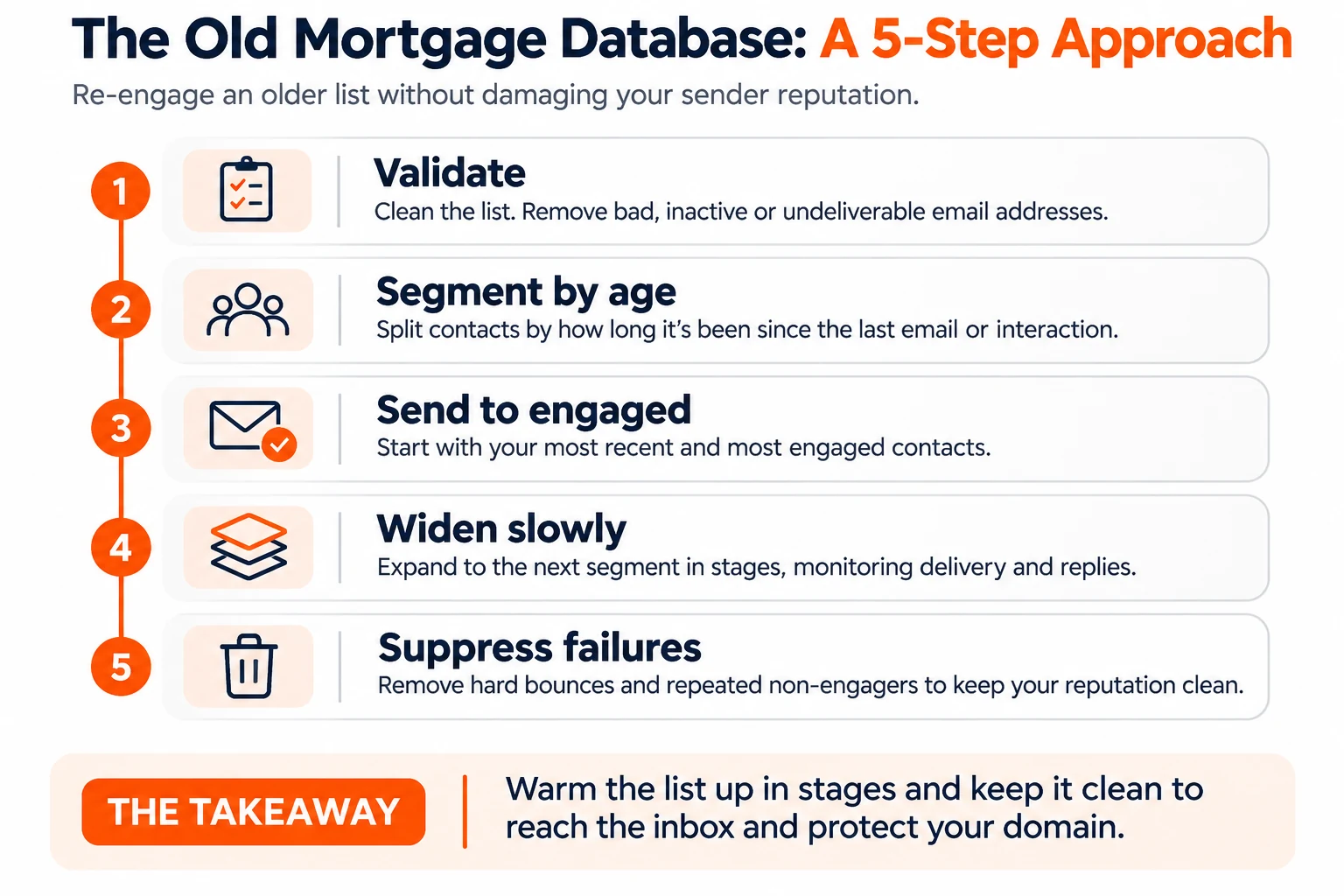
Past clients are worth reaching. A refinance window or a home equity conversation can pay for the whole effort. But the list has to earn its way back to the inbox in stages.
Authentication in plain terms
Three records in your DNS tell the world which servers are allowed to send as you.
SPF lists the servers allowed to send for your domain. Mail from anywhere else fails.
DKIM adds a signature to each message. The receiving server checks it against a public key in your DNS. If the message was altered, the check fails.
DMARC tells receivers what to do when SPF or DKIM fails, and sends you reports. It also checks that the From domain matches the authenticated domain. Bulk sender rules accept a starting policy of p=none, which monitors without blocking.
You do not need to write these yourself. Your sending platform provides the values, and your IT contact adds them. Shape’s domain authentication guide walks through what to expect and how the records get verified.
Sending pattern and volume
Steady sending builds reputation. Spikes spend it.
A domain that sends 200 emails most days and 20,000 on one Tuesday looks compromised. Providers throttle or filter that pattern even when every address is good. Volume should climb in steps, and drips should run on a consistent schedule rather than in bursts.
Pacing matters as much as total volume. A platform that fires a whole list in one minute creates the spike you are trying to avoid. Paced sending spreads the same list over hours. A slow send that lands beats a fast send that burns the domain.
Volume also needs infrastructure sized for it. A shop sending tens of thousands of emails a week runs into limits that a small team never sees. Dedicated sending servers and dedicated IP addresses exist for that case. A high-volume shop on a setup built for low volume pays for it in the spam folder.
This is where automation helps and hurts. Triggered drips keep volume steady because they send as borrowers hit milestones. Bulk blasts create spikes. Our mortgage automation guide covers which steps should run on triggers.
What to measure
Watch four numbers on every send. Ignore the one most dashboards lead with.
| Metric | What it tells you | What to do |
|---|---|---|
| Bounce rate | How much of the list is dead | Rising hard bounces mean bad data. Validate and suppress |
| Spam complaints | How many recipients reported you | Stay well under Gmail and Yahoo’s 0.3% limit. Gmail’s guidance is below 0.1% |
| Unsubscribes | Who wants out | A spike after one send points to the list or the message |
| Delivered vs sent | How much the providers accepted | A gap means rejections. Check authentication first |
Open rates mislead. Apple’s Mail Privacy Protection is built to make it harder for senders to learn about your Mail activity. Some security filters also load images before a person ever sees the email. An open no longer proves a borrower read anything. Replies, clicks and calls are better signals.
Check these after every large send, not at month end. A bounce problem caught on day one costs one campaign. Caught a month later, it costs the domain.
Why the cheapest email tool costs more
A cheap email tool prices the sends and skips the work that gets them delivered.
Here is what usually goes missing:
- Shared reputation. Your mail goes out alongside every other customer’s. Their bad lists become your problem.
- No authentication help. You get a form to fill in. Nobody checks that the records resolve.
- No validation. Old lists go out as they are, bounces and all.
- No pacing. A big list fires at once and creates the spike providers flag.
- No monitoring. Nobody watches bounces or complaints until results collapse.
- A separate system. Email lives outside the CRM, so opt-outs and do-not-contact flags do not follow the borrower.
The subscription saving is real. So is the cost of a domain in spam during a refinance window, with disclosures landing there too.
Lenders comparing mortgage CRM solutions should ask how each one handles authentication, pacing, validation and monitoring. The answers separate a send button from a delivery system.
How Shape handles email deliverability
Shape builds delivery into the CRM, so the work above runs by default.
Authentication. Shape authenticates your business domain or a sending subdomain. We provide the SPF, DKIM and DMARC values and verify the records resolve before you send at scale. Mail goes out through Mailgun’s sending infrastructure.
Validation. Email validation checks addresses before you send, at one cent per email. It flags undeliverable addresses so you can exclude them from the send. The address stays on the record. Run it on old imports, purchased lists and re-engagement campaigns.
Pacing. Standard sending runs at about 1,000 emails per hour, so providers see a steady pattern. Large template sends sit in a queue for a while because of it. Bulk actions process up to 5,000 records per batch, so a full database goes out in several batches. Those are standard limits, and they change with client needs. Enterprise clients on dedicated servers and dedicated IPs can reach much higher limits once their domains are properly warmed up.
Protection. Every automated email carries an unsubscribe link, and an unsubscribe updates the borrower’s record. Sends to contacts on your Do Not Contact list are blocked. Duplicate sends with the same sender, recipient and content are filtered out.
Monitoring. Shape reports sent, delivered, bounced, complaints and unsubscribes. If bounce rates or other metrics cross a set threshold, Shape limits or pauses the send. That stops one bad list from burning the domain’s sending reputation.
None of this replaces a clean list. It keeps a good list landing and stops a bad one from taking your domain down with it.
Inbox placement averages quoted by vendors are left out of this guide. None states a method we could check.