Replacing Your Mortgage CRM Without Touching Your LOS
The data is the easy part.
Almost every mortgage CRM migration that goes badly goes badly for the same reason. Somebody built a careful plan for moving contacts and loan history. Nobody made a list of what else pointed at the old system. The contacts arrive fine. Three weeks later a lead source is still posting into a platform nobody logs into. Nobody can say how long that has been true.
Everything written about this subject is written by the vendor you are moving to. That is useful for the half of the job they perform. It skips the half you own.
Decide first whether the LOS moves
It should not, in almost every case.
The two systems do different jobs. Your LOS holds the loan file and the regulatory record. Your CRM holds the relationship, the outreach and the pipeline before a file exists. Replacing both at once doubles the surface area of a project that is already hard to sequence.
The case for moving both usually comes from frustration rather than analysis. The CRM is bad, the LOS integration is bad, so both look like the problem. Most of the time the integration is the problem and the LOS is fine.
A lender running a heavily configured or homegrown LOS has even less reason to touch it. That system encodes years of process decisions. The CRM does not.
Replace the CRM and keep the LOS. Make the connection between them a requirement of the new platform, not a project of its own.
That is the scoping decision, and switching mortgage CRM is the only part of it worth taking on. If you are earlier than that, where to start on a CRM decision covers selection. Settle the platform first and come back.
What actually moves, and what you are choosing to leave
Bring what earns money in the next ninety days. Funded loans, active pipeline, referral partners.
Old prospect lists come last, and often should not come at all. A list nobody has worked in four years converts badly. The rate does not pay for the cleanup hours.
Two things to settle before anyone exports, and both are the heart of CRM data migration for lenders. Duplicates need a rule that merges the person and keeps the loans separate. A repeat borrower is legitimately on several files. And some of your data is populated and wrong rather than missing. That is worse, because it survives the export looking correct.
Every implementation faces that same set of decisions. They are covered properly in the decisions an implementation actually is. This page assumes you have made them. What follows is specific to replacing a system already in use.
Inventory what is attached to the old CRM
This is the section nobody writes, and it is where migrations actually fail.
Your CRM is not a box of contacts. It is an endpoint. Things point at it, send to it, authenticate through it and pull from it. Most of those connections were configured once, by someone who has since left.
| Attached to the old CRM | What happens if you miss it |
|---|---|
| Integrations and webhooks | Data stops arriving, silently |
| Registered phone numbers | Dialing continues under a brand that no longer matches the registration |
| Email sending domain and DNS records | Campaign mail starts landing in spam |
| Web forms and lead-source posting URLs | New leads post into a system nobody reads |
| Active campaigns and sequences | Borrowers get orphaned mid-sequence |
| Saved reports and dashboards | Built on fields the new system does not have |
| Scheduled exports to accounting or BI | Fail quietly, usually at month end |
Work the list before you schedule anything. Each row has an owner, and several of those owners do not work for you. DNS often sits with whoever built the website. Lead-source posting URLs sit with the vendor sending the leads. Changing one means a ticket on their side, on their timeline.
Two rows deserve more attention than they get.
Registered phone numbers carry reputation. Numbers are registered with the analytics engines under a business identity. Move platforms without moving the registration and you dial under a mismatch. That is one of the patterns those engines score against.
Lead-source posting URLs are the quiet one. A purchased lead source posts to an endpoint. If that endpoint still resolves after cutover, leads keep arriving somewhere nobody is looking, and you are paying for them.
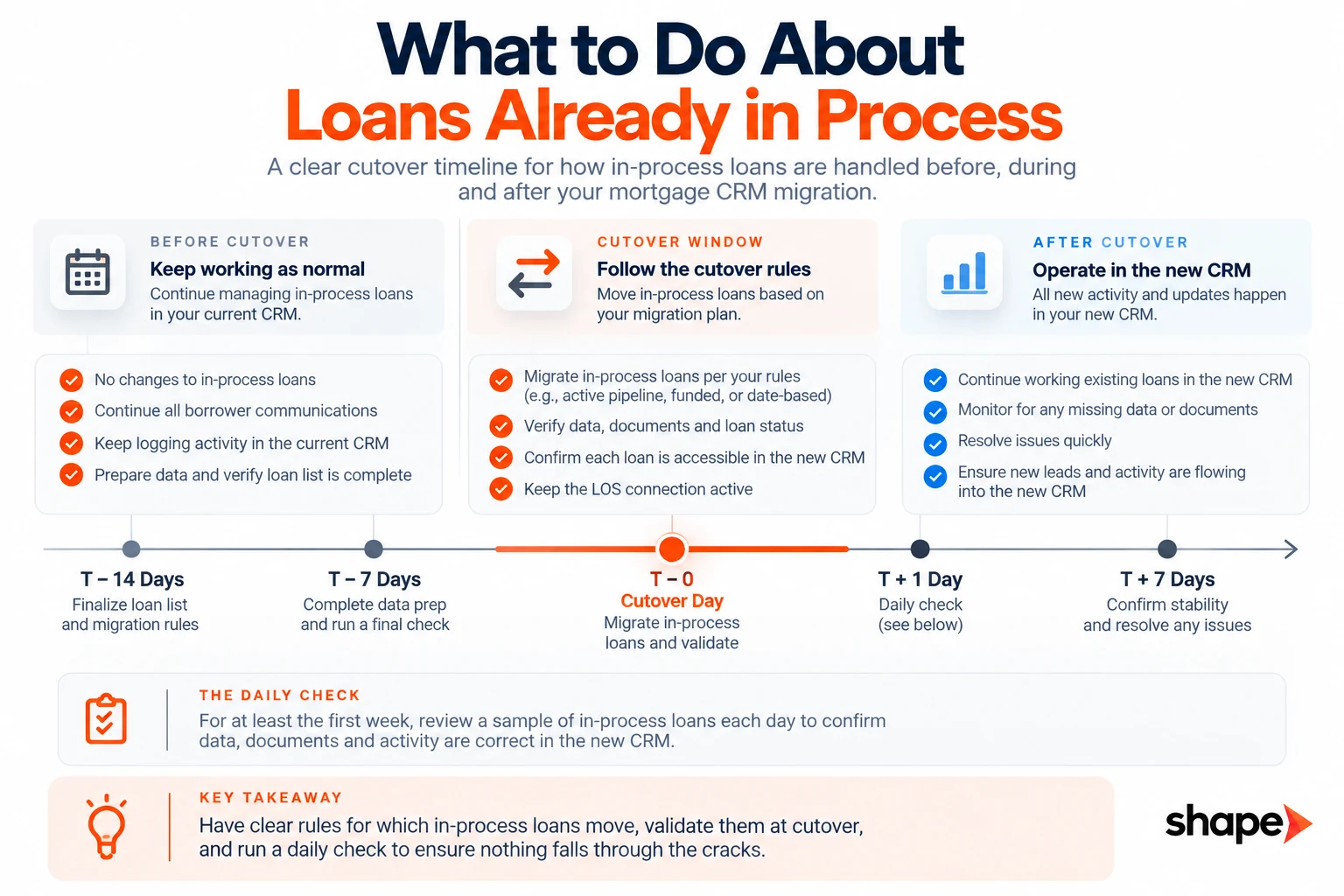
What to do about loans already in process
A live pipeline does not pause for a cutover, so decide the rule before you need it.
Two workable answers. In-flight files finish in the old system and only new business starts in the new one. Or everything moves on a set date and the old system goes read-only behind it.
Both are defensible. Mixing them is not. A loan officer forced to guess which system holds a file will pick wrong. The file that stops updating is the one nobody notices, until a borrower calls.
Whichever rule you set, somebody watches in-process files daily through the transition. Not weekly. A file that quietly stopped updating on Tuesday should be found on Wednesday.
This is also where the new platform earns its keep. You want mortgage pipeline management software that shows every file and its last activity in one view.
Parallel running, and when to stop
Running both systems is the safe choice and it has a cost that nobody prices.
Two live systems means two places to update a record, and people update the one they already know. Within a fortnight you have partial data in both and confident reporting from neither.
Put the end date in the CRM replacement plan at the start. Make it a date rather than a milestone. “When everyone is comfortable” is not a date, and it does not arrive.
The transition that works is read-only. Turn off the ability to write to the old system on the day you planned, and leave it readable. That removes the choice rather than asking people to make the right one. It is the difference between a cutover and a slow drift.
What your contract says about leaving
Read your agreement before you give notice. Notice may start a clock nobody planned around.
Three things to establish, in writing, before anything else happens.
When access actually stops. Termination and access are not always the same date. Find out when you lose the ability to log in, run an export, or open a record. That date governs your whole timeline.
What your current provider will and will not help with. Some agreements include export assistance. Some do not, and a provider with no obligation to help a departing customer will not always prioritize it. Assume nothing that is not written down.
What format you can get, and how many times. A single export in a format you cannot use is worse than it sounds. Ask what the export contains, whether attachments and notes are included, and whether you can run it more than once.
Then take a full export before the account closes. Store it somewhere that is neither the outgoing vendor nor the incoming one. You will want it for records you did not migrate, and you will not get a second chance.
Retention is a separate question and worth raising with your own counsel. Records you no longer use can still carry an obligation. “We left that platform” is not an answer to an examiner. This is Shape’s operating read rather than legal advice. Your compliance team should see the plan before you cancel anything.
The second time is harder than the first
A team that has already survived one bad rollout is harder to move than a team that has never switched.
That is not a training problem. It is a credibility problem, and training does not fix it. People who were told the last system would solve everything have already learned what that promise is worth.
Sequence for it. Prove one workflow end to end before asking anyone to give up a habit. Pick something they already dislike doing manually, make it visibly better, and let that do the arguing. One pattern is the one to avoid. A full feature tour at launch, and everyone back in a spreadsheet by month two.
The other half is making the old system inaccessible on schedule. Good intentions lose to muscle memory every time.
How long a mortgage CRM migration actually takes
Published mortgage CRM migration ranges sit between two weeks and four months. They measure different things.
One guide puts a full CRM migration at two to six weeks. An implementation guide on the same subject puts the project at eight to sixteen weeks. A third puts a basic integration at two to six weeks and a complex one at eight to twelve. None of them says whether platform selection sits inside the window, and none says what counts as done.
Four things move it, and you can assess all four in an afternoon.
How many systems point at the old CRM, which is the inventory above. Whether the LOS is staying, which it should be. How many branches need separating. And whether anything depends on somebody outside your company. DNS changes, carrier registration and lead-vendor endpoint updates all run on other people’s timelines.
A single-branch shop with one lead source and a native LOS connection is weeks. A multi-branch lender consolidating three systems and renegotiating two vendor contracts is months. Anyone quoting you a number before seeing the inventory is quoting an average.
Frequently asked questions
Do we have to replace our LOS when we change CRM?+
No, and in most cases you should not. The LOS holds the loan file and the regulatory record. The CRM holds the relationship and the pipeline before a file exists. Replacing both at once doubles the risk without improving the result. Make the connection between them a requirement of the new CRM instead.
How long does a mortgage CRM migration take?+
Published estimates run from two weeks to four months and measure different things. Four variables decide it. How many systems point at your old CRM. Whether the LOS is staying. How many branches need separating. Whether any step depends on an outside party. A single-branch shop is weeks. A multi-branch consolidation is months.
What happens to loans already in process?+
Pick one rule and hold it. Either in-flight files finish in the old system while new business starts in the new one. Or everything moves on a set date, and the old system goes read-only. Mixing the two is what loses files. Whichever you choose, check in-process loans daily through the transition rather than weekly.
Can we get our data out of the old CRM after we cancel?+
Often no, and the date access stops is not always the termination date. Check your agreement before giving notice, because notice may start a clock. Confirm what the export contains, what format it comes in, and whether your provider is obligated to help. Take a full export before the account closes and store it independently.
{“@context”:”https://schema.org”,”@type”:”FAQPage”,”mainEntity”:[{“@type”:”Question”,”name”:”Do we have to replace our LOS when we change CRM?”,”acceptedAnswer”:{“@type”:”Answer”,”text”:”No, and in most cases you should not. The LOS holds the loan file and the regulatory record. The CRM holds the relationship and the pipeline before a file exists. Replacing both at once doubles the risk without improving the result. Make the connection between them a requirement of the new CRM instead.”}},{“@type”:”Question”,”name”:”How long does a mortgage CRM migration take?”,”acceptedAnswer”:{“@type”:”Answer”,”text”:”Published estimates run from two weeks to four months and measure different things. Four variables decide it. How many systems point at your old CRM. Whether the LOS is staying. How many branches need separating. Whether any step depends on an outside party. A single-branch shop is weeks. A multi-branch consolidation is months.”}},{“@type”:”Question”,”name”:”What happens to loans already in process?”,”acceptedAnswer”:{“@type”:”Answer”,”text”:”Pick one rule and hold it. Either in-flight files finish in the old system while new business starts in the new one. Or everything moves on a set date, and the old system goes read-only. Mixing the two is what loses files. Whichever you choose, check in-process loans daily through the transition rather than weekly.”}},{“@type”:”Question”,”name”:”Can we get our data out of the old CRM after we cancel?”,”acceptedAnswer”:{“@type”:”Answer”,”text”:”Often no, and the date access stops is not always the termination date. Check your agreement before giving notice, because notice may start a clock. Confirm what the export contains, what format it comes in, and whether your provider is obligated to help. Take a full export before the account closes and store it independently.”}}]}