Every implementation plan you will be handed is a list of phases. None of them is a list of decisions.
That gap is the reason so many of these projects land late and land wrong. A mortgage CRM implementation is not really a build. It is eight or nine choices about how your operation works. They get made once, mostly in the first fortnight, by whoever is in the room. Get them right and configuration is quick. Get them wrong and you pay for it three years later. Fields nobody trusts. Reports nobody runs.
This is the list of those choices. Implementing a mortgage CRM well means making them on purpose. What each one costs you either way, and when it has to be made.
A mortgage CRM implementation is a sequence of decisions, not phases
The phases are real. Discovery, configuration, migration, training, go-live. They are also the wrong unit of planning. Every phase contains one decision that determines the rest, and a hundred tasks that do not.
Here are the ones that matter.
Which system owns which record. What your LOS connection actually carries. Whether your pipeline mirrors your LOS or maps to it. What data you bring across and what you leave. Whether your opt-out data can be trusted. Who can see which branch. How leads get routed when nobody is at their desk. And which pieces of setup have an external clock running on them.
Answer those and the project is mostly typing. Skip them and you will answer them by accident, which is how most lenders answer them.
One thing this page does not cover is which platform to buy. That is a separate exercise. If you are still choosing a CRM for a mortgage team, start there and come back. Everything below assumes the contract is signed.
Decide your system of record before you move any data
Write down which system owns the borrower, which owns the loan file, and which is a copy. Do it before anyone exports anything.
This sounds obvious. It is the single most common thing nobody does. The failure looks like this. The LOS owns the loan. The CRM owns the relationship. Someone builds a reporting layer in a third tool. Within a year three systems hold overlapping borrower data, and nobody can say which is right. Then a status disagrees across two screens and the answer is a meeting.
The rule that holds up: one system owns each field, everything else displays a copy, and copies are never edited. Your LOS owns loan status because that is where the file lives. Your CRM owns contact detail, consent state and activity history because that is where the outreach happens. A reporting tool owns nothing.
The decision is cheap now. It costs a data project later.
What actually syncs, and what you will be re-keying
The question is not whether a vendor integrates with your LOS. Every one of them does. LOS integration is the connection that decides how much manual work your team inherits. What matters is what it carries and whether it extends.
A native API connection is the one to want. It can carry any data point the source system exposes, in either direction. It also survives your LOS adding a field next quarter, with no vendor build in between.
That option is not always on the table. Some platforms expose a limited API. Others opened a fuller one recently, after the integrations were already built. Where a native path does not exist yet, middleware is how the connection gets made, and it works.
Being specific about our own. Shape’s mortgage CRM integrations run by API with many loan origination systems, such as Encompass, LendingPad, LendingDox and Byte. Others connect through Zapier, including ARIVE and Jupiter. Both routes are in production at scale, and both move the fields those platforms expose. We add systems as lenders bring them, and a connection moves to API when the platform opens one.
Middleware also earns its place permanently, across the long tail. Lead sources, scheduling, web forms, and the dozens of systems that need one or two fields moved on a trigger. Building each of those natively would be slower and would carry no more data.
The failure mode is not the tool. It is a field map nobody has extended. A connection carrying a list someone drew up two years ago leaves the rest to be typed by hand. That is true whether the list sits in middleware or in a native build.
Extended field map
Unextended field map
What it carries
Any field the LOS exposes, both directions
A list fixed when the connection was built
When the LOS adds a field
Available once mapped
Not carried until someone reopens the build
Where re-keying lands
Edge cases only
Processors, on every file
What usually goes missing
Nothing structural
Employment, income, payment detail, party screens
How you find out
You do not
Month two, from a processor
Those four categories are the ones we see go missing again and again. Nobody catches it during a demo, because nobody demos the party screen. They catch it in month two, when a processor is re-keying income from one tab into another.
The second constraint sits on your side of the connection. Ask how much of the loan file the CRM models as standard before you ask about custom fields. Shape carries roughly 1,500 standard fields, including the full MISMO 3.4 set. That is why custom fields stay for edge cases rather than becoming the way a loan gets stored. A platform that models none of it turns every mortgage concept into a custom field. Then the cap matters enormously. Shape’s out-of-the-box limit is 80 custom fields on top of the standard set. That is a default rather than a ceiling.
Four questions for the demo, and what a weak answer sounds like.
Ask
A weak answer
What does this connection carry today, and what is left off it?
“It’s a full integration.”
Can it carry a field our LOS adds next quarter, and what does that take?
“We’d look at that on our roadmap.”
How much of the loan file is modelled as standard?
“You can build any field you need.”
Is the custom-field limit a cap or a default?
A number, with no answer on what happens past it.
None of those replies is a lie. Each one avoids the question, and each one is the answer you get when the honest version is unwelcome.
There is a live example of why this matters, and it is worth stating precisely. ICE requires customers and partners to transition off the Encompass SDK by December 31 2026. The replacement is Encompass Developer Connect APIs or native Encompass functionality.
Two details the trade coverage gets wrong. The SDK is still maintained, and no new features are being added to it. And December 31 2026 is the Encompass SDK transition deadline, not the switch-off. Anyone needing access past that date requests complimentary transitional access from their ICE relationship manager. ICE says a hard sunset follows at a future date it has not yet set.
Shape’s Encompass integration is API-based and was never built on the SDK, so nothing changes here. The point is broader than one vendor. Connections built on a closing technology carry a date you do not control. Ask what yours is built on.
Should your CRM pipeline mirror your LOS milestones
Mapping beats mirroring, and the reason is the application boundary.
The argument for mirroring is strong. Operations already speak in LOS milestones. If the CRM says something different, every conversation needs a translation, and managers stop trusting the pipeline view.
The problem is that LOS statuses only exist once there is a loan file. Leads and applications have no milestone, because the LOS has never heard of them. Mirror the milestones and your status list fragments at exactly the point where handoffs happen. Your team works one vocabulary through prospecting and another from application onward. The automation that runs off status breaks in the gap.
The version that works is a mapping. Keep one status list spanning leads, applications and loans. Drive it from the LOS milestones. Then change the display labels so the two read the same on screen. Operations get their vocabulary. You keep one spine for campaigns, views and reporting.
The thing not to do is edit the raw LOS status list to make it prettier. That list is what your LOS sends. Change it and you break the connection.
The data you bring, the data you leave, and the data you can no longer trust
Mortgage CRM data migration is three decisions. The third is the one nobody plans for.
First, what comes across. Funded loans and referral partners first, because those are the records that earn money in the next ninety days. Old prospect lists last, if at all. A ten-year-old list converts at a rate that does not justify the cleanup hours.
Second, how duplicates are handled. A repeat borrower legitimately appears on several loans. Merge on contact and you can lose the loan history. The rule is to merge the person and keep the transactions separate.
Third, and this is the one to sit with: some of your data is present, populated and wrong. Not missing. Wrong, and indistinguishable from right.
We worked with a lender switching mortgage CRMs. Its previous system had been storing deal stages on the contact record. Contact stage, lead stage and deal stage all written to one field over several years. The values survived the export perfectly. Every one of them is now unusable. Nothing in the file says which kind of stage a given value was.
Nobody knew until the migration, and that is the useful part. A decade of that data had already been unusable. They had been running campaigns on it the whole time. Moving is what surfaced the problem and what ends it.
From the first clean record onward, they segment on things the old structure never separated. Where a borrower is now. What they last applied for. Which loan a given conversation belongs to. That is a capability they never had. It arrived with the migration rather than in spite of it.
No import repairs the history. What you do is find it before migration. Decide which fields you are formally giving up on. Say so out loud, so nobody builds a campaign on them later.
Once the data is in, the question changes. It stops being what to bring and becomes what standard you hold it to. That discipline runs forever, not for six weeks. Set the hygiene standards we recommend during implementation, while everyone is still paying attention.
Check whether your opt-out data is real
Do not import a suppression list you cannot explain.
Two things get collapsed in almost every migration. “Do not call” is a channel instruction. “Do not contact” removes someone from everything. Most exports carry one column and it means whichever one the last admin assumed.
Worse, a registry-sourced suppression and a checkbox somebody ticked in 2019 look identical after export. One is a legal obligation. The other is a note.
Decide before import which you trust. If the list cannot be explained, reset it to the records you can verify. Then scrub against the registry itself rather than against your own history. A lender we worked with went through this and found five genuine entries.
Whatever you decide, decide it on purpose. A suppression list is the one dataset where being wrong costs you both ways. Too broad and you have deleted your own pipeline. Too narrow and you are calling people who told you not to.
Compliance decisions get made by default if you don’t make them
Configuration is where your compliance posture is set, whether anyone frames it that way or not.
Four choices carry consequences. Who can see which branch’s records. Whether the audit trail captures who changed what and when. Whether consent state survives the migration intact. And whether call recording is set for the states your team dials into, not the state head office sits in.
None of those appear on a project plan as compliance items. They appear as permissions, settings, a migration mapping and a phone configuration. They get made in week two by whoever is clicking.
Two more sit slightly outside the CRM and still get decided here. Consent audit trails need to be readable by someone who was not there. Licensing scope belongs in your routing rules. Sending a borrower to an officer not licensed in that state is a configuration error with a regulatory shape.
This is Shape’s operating read rather than legal advice, and your counsel should see the configuration before it goes live. Ask them the specific questions early. “Is our CRM compliant” is not a question anyone can answer. “Does this audit trail satisfy our examiner” is.
The setup work with a clock on it has to start first
Three parts of mortgage CRM setup have an external dependency. They are routinely started last.
10DLC registration. Carrier approval for business texting runs from a few days to a fortnight. It depends on your public website. You need the right opt-in language, a consent checkbox, and links to terms and privacy. Registrations get denied for website copy. Then the clock restarts. Start this the day you sign, not the week before launch.
Email domain authentication. The DNS records have to be added by whoever controls your domain. That is often someone outside the project, sometimes outside the company. Until it is done, your campaign email lands in spam.
Caller registration and number reputation. New numbers are recycled numbers. They arrive carrying whatever the last owner did with them. Carrier analytics run the scoring behind the spam label from the first day you dial. Registering numbers before you start dialing is cheaper than remediating flags afterwards.
Every one of these depends on somebody who does not report to you. That is what makes them different from configuration, and it is why they belong in week one.
Routing and coverage rules get decided before go-live, not after
Four questions, and the fourth one is where most shops get caught.
Who receives a new lead. How long they hold it before it goes back in the pool. What happens when nobody acts. And what all of that does during hours nobody is working.
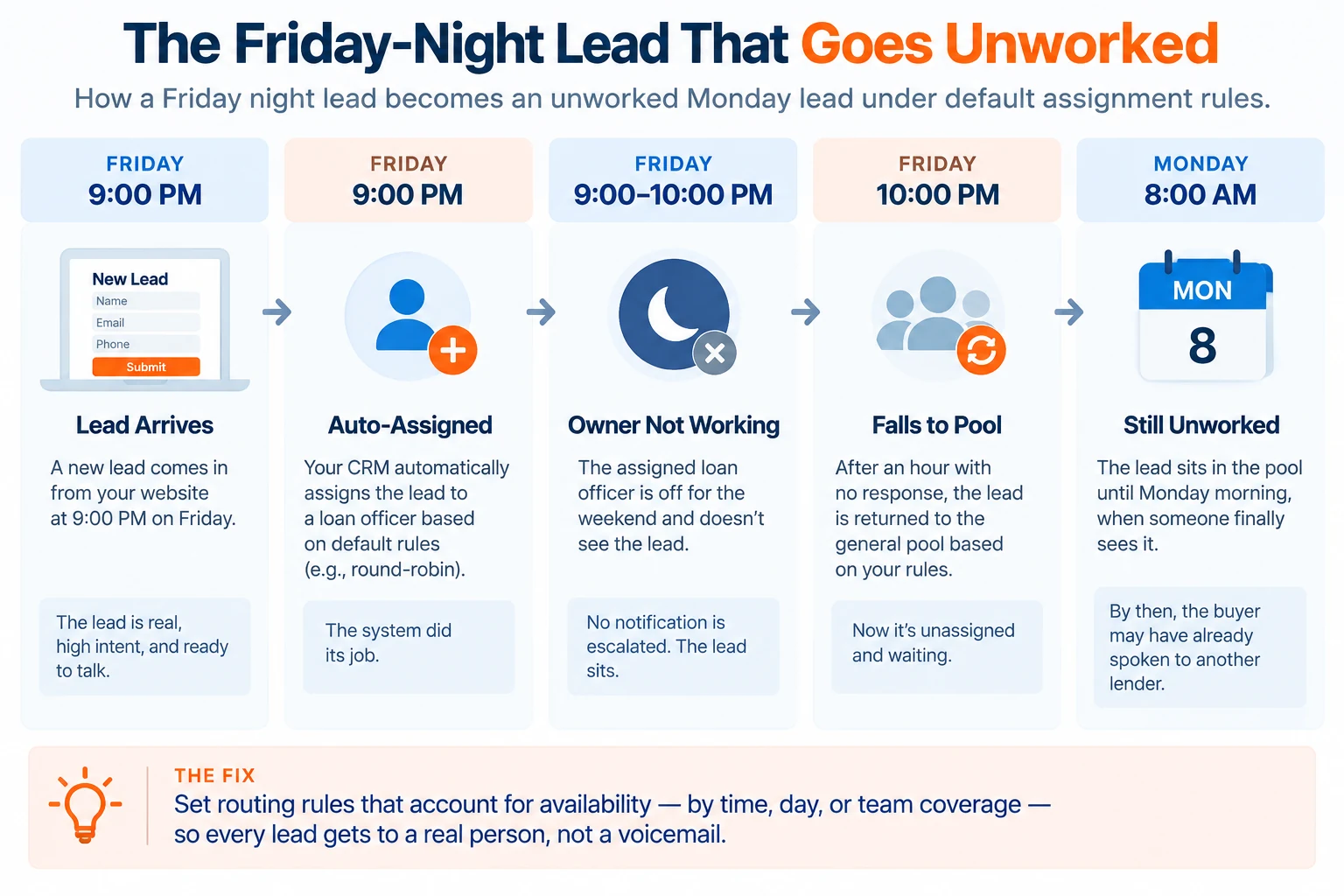
That last one produces a specific failure. A lead arrives at nine on a Friday night and gets auto-assigned. The owner is not working. The rule gives them an hour. At ten the lead falls into the pool, unworked, and sits until Monday. Meanwhile the one person who does work weekends has nothing to claim. The system gave everything to people who were not there.
Auto-assigning into hours nobody works is worse than leaving leads unassigned. Unassigned, they are available to whoever shows up. Assigned, they are locked to someone asleep.
Set distribution hours separately from claim timers. Decide whether weekends run on assignment or on a pull queue. Put state licensing into the routing rule rather than leaving it to the officer to notice. Check what your timers count. Call attempts and contact attempts are different numbers, and the rules run on whichever you picked.
Getting people into the system, and why launches slip here
Seat provisioning is the most common reason a go-live date moves, and no implementation guide mentions it.
In a branch network, every user is an HR step before it is a software step. Opt-in forms get verified. Assistants need their own accounts, because shared logins get blocked and should be. Seats cost money, and that money comes out of somebody’s number, which means somebody has to approve it.
There is a second thing nobody plans for. Corporate choosing a platform does not always mean producers are required to use it. Where adoption is optional, provisioning is a signup campaign rather than an IT task. Decide which one you are running before you set a launch date. The two have completely different timelines, and only one is under your control.
Start provisioning before configuration is finished. It runs in parallel and it has a longer tail than anyone expects.
Training is the other half, and the competing guides treat it as a phase at the end. It is a sequencing decision. Train before the data lands and you are teaching an empty system, which nobody retains. Train two months after go-live and the habits have already formed around the old tool.
What works is two rounds. One short session on the daily workflow near go-live. Then role-specific sessions once real records are in and people have questions. Fifteen minutes each, not four hours.
A launch where most of the team has not been trained is not a launch. It is an install.
What the published timelines and costs are worth
Very little, and the reason is worth showing.
Every published CRM implementation timeline is a range with no method behind it. Two guides rank for this subject. One puts a mortgage CRM implementation at 8 to 16 weeks. The other breaks it into four phases totalling 4 to 8 months. Neither says what it is measuring. Neither says whether platform selection sits inside the window or before it. That is a factor-of-two disagreement about the same project, which means at least one of them is measuring something else.
Our read: the range is real and the variables are knowable. Four things move it. How many systems feed the CRM. Whether your data has one owner or four. How many branches need separate environments. Whether anything has an external clock on it. A single-branch shop with one lead source and a native LOS connection is weeks. A multi-branch lender consolidating three systems is months.
Figures we left out of this page, and why. One firm publishes a 95% implementation success rate across 400-plus engagements. That is its whole book across every financial-services vertical it serves. It is not a mortgage figure, and nothing states how success was defined. A $99 average starter price appears elsewhere with no source at all. Neither survives a basic check, so neither is here.
After go-live, watch the first thirty, sixty and ninety days. Three things predict whether it stuck. Are statuses being updated. Does the pipeline view match what managers believe. Is anyone still working out of a spreadsheet. A configuration decision is cheap to change at week six. At month six it has reports built on it.
Frequently asked questions
How long does a mortgage CRM implementation take?+Published estimates run from 8 to 16 weeks up to 4 to 8 months. Neither states what it measures. The honest answer depends on four things. How many systems feed the CRM. Whether your data has a single owner. How many branches need separating. Whether any setup task depends on an outside party. A single-branch shop with one native LOS connection is weeks. A multi-branch consolidation is months.
Do we have to migrate everything?+No, and trying to is a common way to lose a quarter. Bring funded loans and referral partners first, because those records produce revenue soonest. Old prospect lists convert at rates that rarely justify the cleanup. Leave behind any field you cannot explain. Say publicly which ones those are, so nobody builds a campaign on them later.
Can we keep our existing phone system?+For calling, often yes. For compliant business texting, usually no, because texting is tied to the registered number and the CRM’s own telephony. Teams that keep an outside phone system end up with call activity in one place and texts in another. That defeats the record you were building.
Which system owns the loan record, the CRM or the LOS?+The LOS owns the loan file, because that is where the file legally lives and where underwriting happens. The CRM owns the borrower relationship, the contact detail, the consent state and the activity history. Decide this in writing before migration, because every reporting argument you will have later traces back to it.
Kevin Benner is the Chief Revenue Officer at Shape Software, where he leads revenue, marketing, and customer growth. He brings over 23 years of experience in mortgage lead generation and sales technology.
Your connect rate is falling and your dial count is climbing. The numbers still ring. Borrowers see “Spam Likely” and decline. Most shops respond by buying more numbers or dialing harder. Both are the wrong move, and both are what the category keeps recommending. Caller reputation for mortgage lenders is scored on how your traffic […]
The best enterprise mortgage CRM for a multi-branch lender solves a tension, not a size problem. You want each branch free to build workflows that fit how it sells. You also need every one of those workflows to stay compliant. Most platforms give you one or the other. Eight platforms below operate at branch scale, […]
The right mortgage marketing agency runs your marketing and leaves you owning everything it builds. Most lists of mortgage marketing agencies are written by an agency that ranks itself first. Shape builds mortgage CRM software and sells no agency services. None of these firms is ours, and none paid to be here. This guide compares […]