Google Ads for Loan Officers: Setup, Rules and Tracking
Google Ads for loan officers works. Almost none of the advice written about it does.
The guides ranking for this term were written for service businesses generally. They tell you to pick keywords, add negatives, and target your ZIP codes. That last instruction will get your ad disapproved. Mortgage sits inside a restricted advertising category, and ZIP-code targeting is not available to you. The same is true of Google Ads for mortgage brokers, retail loan officers and bank lenders alike. Three things decide whether a mortgage account works. Where you are allowed to show the ad. What you are allowed to say in it. And whether a loan that funds sixty days from now ever gets back into the bidding. Everything else is setup. Paid sits next to referrals, purchased leads and your database. Start with where paid fits alongside your other channels.What Every Guide Already Tells You
Keyword research. Negative keywords. Match types. Ad extensions. Landing page relevance. Conversion tracking. Every page ranking for this term covers these. They are the same for a mortgage account as for a dentist. They are also correct. Add “jobs,” “salary,” “calculator” and “free” as negatives. Send each ad group to a page about that thing. None of this is wrong. None of it is the difference between an account that funds loans and one that burns a budget. The difference sits in the three constraints below, and they are specific to lending.Your Targeting Options Are Narrower Than Any Guide Admits
Mortgage advertising falls under Google’s Consumer Finance category in the United States and Canada. Google bars targeting those ads by age, gender, marital status or parental status. ZIP code location targeting is barred for the same categories. The policy has been in force since October 2020 and still governs the account you open today.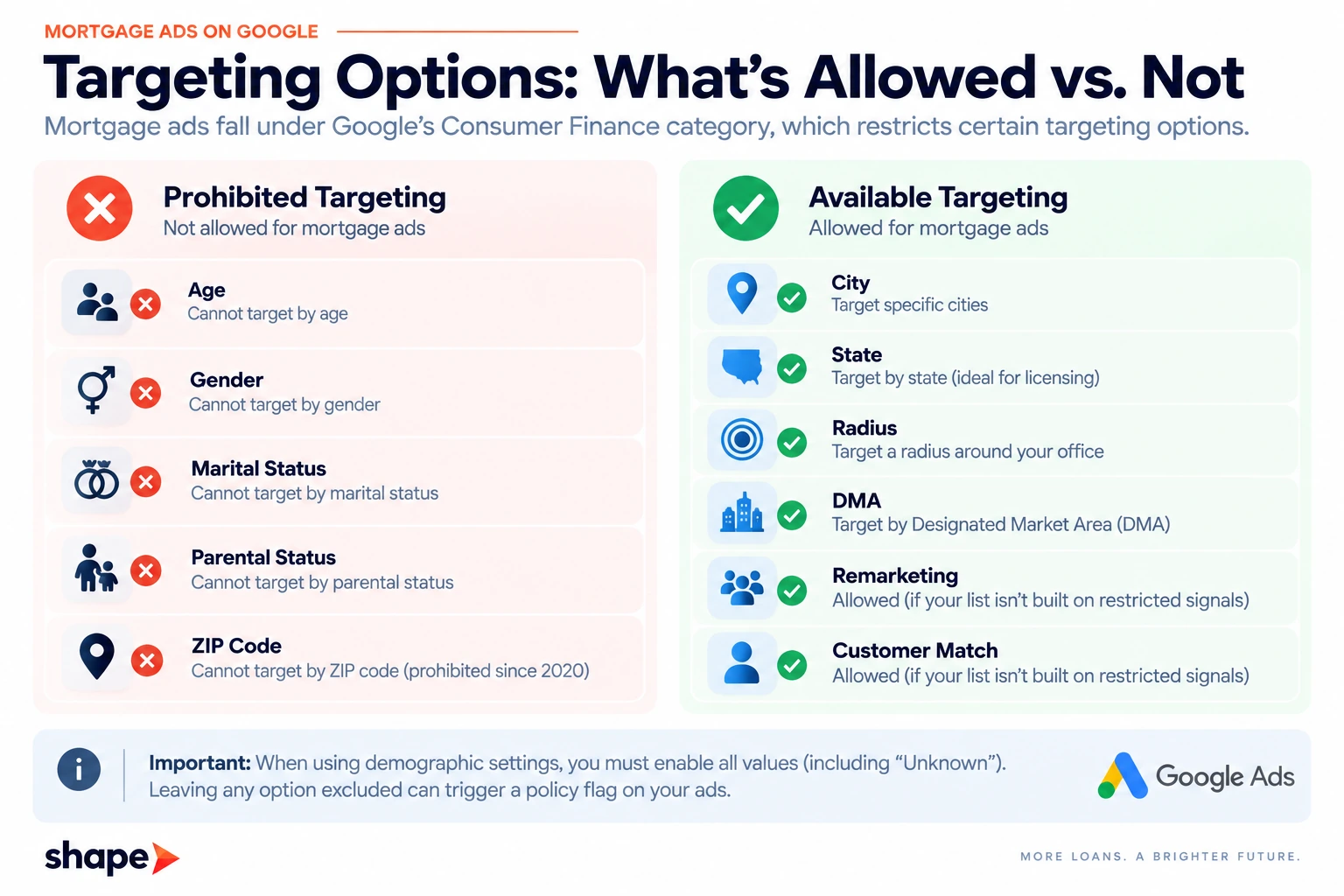
Licensure Is a Separate Question From Policy
Google’s rules say nothing about where you hold a license. Your ads can serve in states you cannot originate in. Those clicks cost the same as the ones you can use. Target the states on your NMLS record and nothing else. Set location options to presence rather than presence or interest. That way you pay for people inside your footprint, not people reading about it. A borrower researching Florida from Ohio is not a lead if you are licensed only in Ohio.What You Are Allowed to Say
Ad copy in lending is governed by rules that have nothing to do with Google. Two of them shape what fits in a headline. Regulation Z sets out triggering terms. Four of them apply to closed-end credit. The amount or percentage of a down payment. The number of payments or period of repayment. The amount of any payment. The amount of any finance charge.State one of those and the ad has to carry additional disclosures. A responsive search ad headline is 30 characters. The disclosure does not fit. The practical answer is to keep the number out of the ad and put it on the landing page.
One of those four is narrower than it looks. Regulation Z defines down payment for credit sales, which leaves an open question about whether it reaches an origination ad. That rarely changes what you can run, and Regulation N still governs whether the claim is accurate. Our post on what forces a trigger-term disclosure has the detail and the question to ask your compliance officer. That rarely changes what you can run, and Regulation N still governs whether the claim is accurate. Our post on what forces a trigger-term disclosure has the reasoning.
Rate claims are the second. Superlatives like “lowest rates” invite a UDAAP problem if you cannot substantiate them. Substantiating a claim across a market you do not control is hard. Advertise what you can prove. Your NMLS number belongs in the ad or on the page it lands on. Which one depends on your state and your brokerage’s policy. This is Shape’s operating read, not legal advice. Take the specifics to your compliance team. State advertising rules vary, and this section is written against the federal floor.Getting a Funded Loan Back Into Google
This is where mortgage accounts break, and no page on this SERP addresses it. Google bids toward the conversion you report. Report form fills, and it learns to find people who fill in forms. That is not the same population as people who close loans. A mortgage sales cycle runs 30 to 90 days. By the time you know which click was worth anything, the campaign has spent weeks bidding on the wrong signal. The fix is to send the outcome back. Capture the GCLID on the form, store it on the lead record, and upload the funded loan against it later. Bidding then runs on closings rather than on submissions. This is a mortgage CRM integrations question before it is an ads question. The identifier has to survive from the click through to the funded file.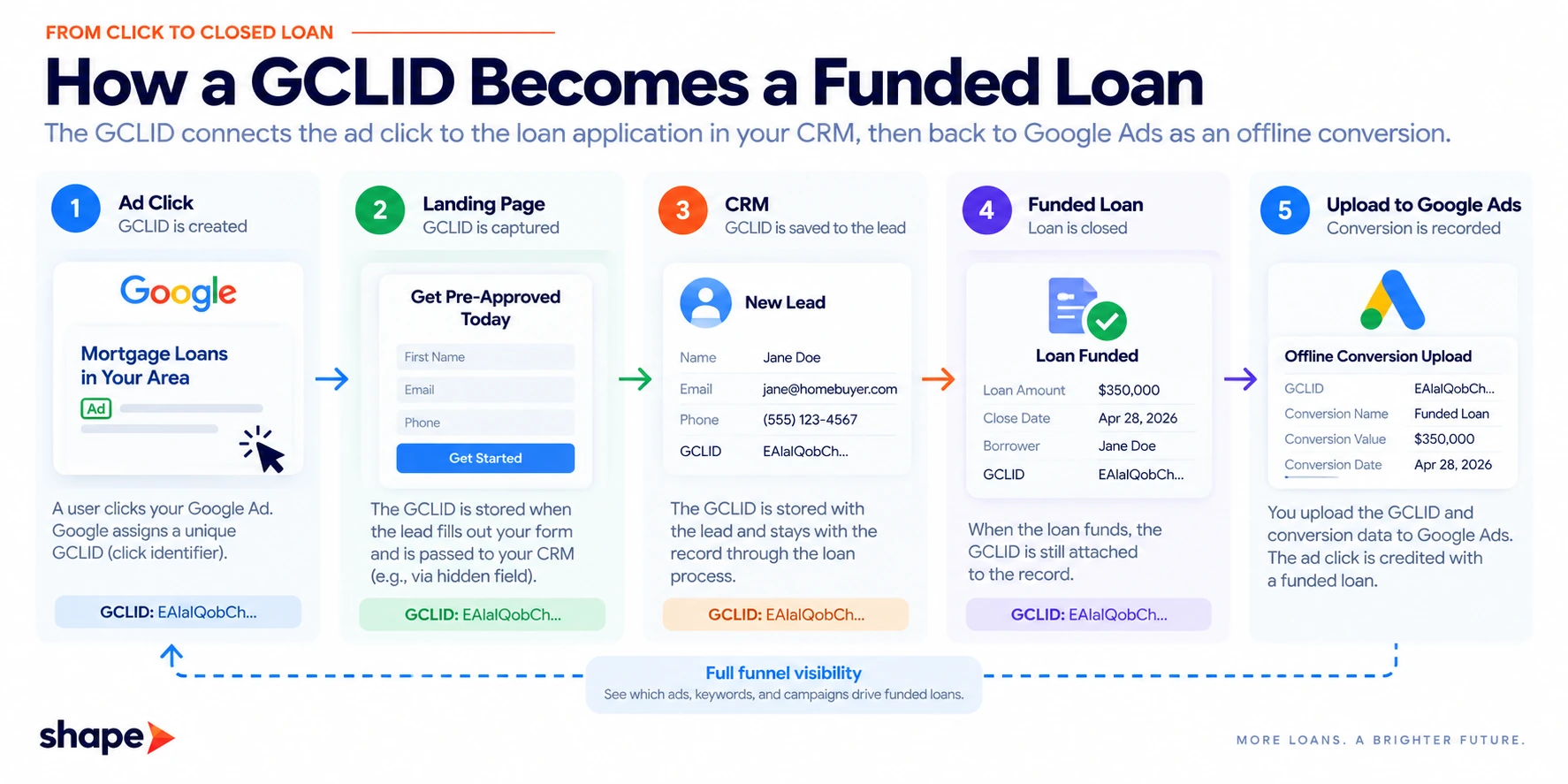
Match Type Is Downstream of This, Not Separate From It
Broad match is where mortgage budgets go to die. The reason is the conversion signal, not the match type. Broad match finds more of whatever you told Google to value. Feed it form fills and it will find people who fill in forms. Rate shoppers, tyre kickers and students writing papers all fill in forms. Feed it funded loans and the same setting starts working for you. The sequence is fixed. Get the outcome reporting right, then open up match types. Doing it the other way round is how a budget disappears in three weeks.Offline Conversion Tracking in a Mortgage Account Changed on June 15 2026
The route for doing this moved, and most advice written before mid-2026 is now wrong. From June 15 2026 the Google Ads API stopped accepting new adopters of offline conversion imports. That includes enhanced conversions for leads. New adopters calling UploadClickConversions get an allowlisting error, and allowlisting is granted by developer token. The Data Manager API is the route forward. The qualifying window is stated two different ways by two Google properties. The Ads Developer Blog gives December 2025 to May 2026. The Google Ads Help article gives January 2026 through June 2026. We have not found a reconciliation. Check your own token’s status rather than working out which window you fall inside.The Part That Matters to a Solo Originator
None of the above applies to you if you are not writing against an API. Uploading conversions as a CSV through the Google Ads interface is not an API call. The June change does not affect it. Export your funded loans with their GCLIDs and conversion dates, upload the file, and the bidding gets the same signal. It is manual and it works. No agency page mentions it, because agencies are the ones with developer tokens. Two related changes matter if someone is building this for you. Customer Match uploads through the Google Ads API stopped on April 1 2026. IP address and session attributes in conversion imports went to an allowlist in February 2026. Both point at Data Manager.Call-Only Ads Are Ending
Google stopped supporting new call-only ads in February 2026. Existing call-only ads stop serving in February 2027. Responsive search ads with call assets replace them. This lands harder on loan officers than on most advertisers, because the phone is the conversion. If your account still runs call-only ads, they have a fixed expiry and a migration ahead of them. Build the replacement now rather than in the month it breaks.Google Ads for Loan Officers: The Setup Order
- Confirm your licensed states and set location targeting to presence only.
- Set every demographic value to enabled, including Unknown.
- Remove ZIP code targeting if it is there.
- Get a GCLID field onto your lead form and into the CRM.
- Decide your conversion before you decide your budget. Funded loan if you can report it, application if you cannot.
- Check whether a call-only ad exists in the account.